
Ministry involves a lot of meetings. Few people enjoy meetings, but unless you are the only one involved in a particular ministry (or desire to be the only one involved in the ministry!) - meetings are unavoidable. One of the challenges of organising a meeting is finding a time to meet. There are two ways you can organise a meeting time:
1. set a time, send out the email, and wait for the emails to come back in from people who can't make the time you suggested. This cycle can continue indefinitely!
2. make use of the free online tools that help you organise a time that will suit everyone.
I've been exploring some of the websites that assist in the process of finding a suitable meeting time. Whilst they have varying features, the basic premise of each is this:
1. As the event (meeting) organiser, you select the dates and times that you are available to meet.
2. You send details of the event (a link to a website) to the people you would like to attend the meeting.
3. On the website, the invitees select their available times from the list of times you provided.
4. You review the times people are available, and settle on a time for the meeting.
5. You email the invitees the confirmed time.
This is a time-efficient and cost-effective (i.e. free) way of working out a meeting time. It avoids emails coming back and forth and frees you up to prepare for the meeting itself. Here are a couple of suggestions for websites you can use to arrange your meetings.
 It's not the prettiest website to use, but it's very easy to use. Here's a screenshot of what an invitee would see when they click on the link to the event you send them via email:
As the event organiser you are given a link to view the results (i.e. the dates and times that work for your invitees).
Meeting Wizard

Meeting Wizard has more options that you can select from when creating a meeting. For instance you can select the duration of the meeting, specify if the meeting times are approximate or definite, and select the type of meeting (face to face, teleconference, social, etc). You can also decide if you would like the invitees to know the other people you have invited to attend, and if you would like them to be able to see the times that suit others (see screenshot). You can even create a reminder to automatically be sent to invitees X days before the meeting.
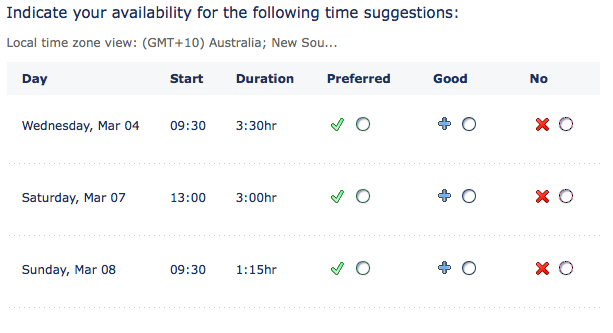
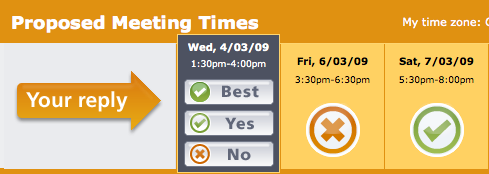 One of the features I really like about both Schedule Once and TimeBridge is the ability for invitees to indicate preferred times. Not only can you give your invitees the option to say 'yes' or 'no' to a proposed time, but they can also indicate if a particular time works best for them - creating a hierarchy of preferences, if you will.
Other options
A couple of other options to explore include:
"¢ Meeting Puzzle
"¢ Time to Meet
"¢ Meet-O-Matic
Recommendation
For my money (or lack thereof), When is Good is the simplest and easiest solution. However, your meeting needs might be different to mine, so let me encourage you to explore these options and find a better way to arrive at a suitable meeting time.


