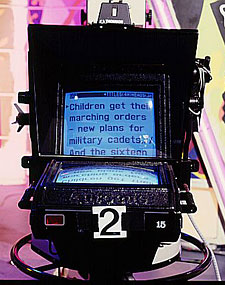
 Ever wondered how newsreaders seem to manage to memorise their entire script? Well, in case you hadn't realised, they're actually reading from a special tool called an autocue or teleprompter. Using a clever setup of mirrors (but no smoke!) they project the text from a computer screen directly in front of the camera lens. The best TV presenters can read this without moving their eyes, creating the impression that they are using no notes at all.
A similar setup is used by some public speakers utilising what have come to be known as presidential screens. These small A4-sized perspex screens are mounted on floor stands front-left and front-right of the lectern at eye-level. The computer image is then reflected off floor-mounted computer monitors, so that the speaker maintains eye contact and avoids the need to look down at his or her notes. Our own Archbishop has used this technology for his previous Synod presidential addresses.
The cost of using such a system has often been prohibitive. Professional autocue systems start at around $3,000 for the software, plus up to $10,000 for the full package.
Consequently, I sought to find a solution that might be accessible and useful for churches and conferences. I have experimented with autocue-like systems for some time while leading sessions at the KCC Kyck convention and the TWIST Music Conference. It has been an interesting journey mixed with failure, frustration, and eventually, some success.
Initially, I used a large TV which was placed on the floor at the edge of the stage, next to the foldback speakers. This screen displayed the text of a computer running MS Word, and my helper off-stage typed directions in real-time, which allowed me to lead without needing to hold notes. This was a good initial solution, but was only useful for very short and immediate communication, (such as "NEXT: INTERVIEW WITH NATHAN TASKER" and so forth.
Next, I tried a system that also used the floor TVs, but in a way that allowed the information to be pre-programmed and synchronised with the song words. To do this, I used a specially-formatted PowerPoint template that provided the song words on the bottom third of the screen, and allocated the top two-thirds for comments. The people on stage saw both the comments as well as the song words, but due to some clever video mixing, only the bottom third containing the song words was displayed on the main screens for the congregation to see.
This solution showed promise, but had some limitations. Firstly, by displaying the words on floor TVs, it meant that people on stage were always looking down, which looked strange. Secondly, and perhaps even worse, by only having two lines at a time of song words, and only a few lines of comments, it made it very difficult for the on-stage presenters to know what was coming next.
My final attempt was to research whether I might be able to find a solution that would provide the benefits of a "real' autocue, without the prohibitive cost.
The solution came from watching Australian Idol (of all things!) I noticed that the presenters were reading from an autocue that was being displayed on a screen at the rear wall of the venue.
I realised that other than the cost of a spare data projector, we could perhaps find a solution that didn't cost the earth. Your church may not have a spare data projector for this purpose, but it is often possible to borrow one for a special event.
All that was left was the software to display the scripts. I did some research to see what was available for download from the Internet. Some freeware was limited in its features, and some commercial software was either too expensive or was not available to me for trial.
Finally, I came across a program called "ProPrompter', which sells for $125USD (around $150AUD). I am pleased to say that it provided the smooth-scrolling text found in professional programs, without the high cost. You can download a trial at [url=http://www.propromptersoftware.com]http://www.propromptersoftware.com[/url]
Now that I found the software, I took it for a test drive as I compered the Christian Schools' Rock Challenge a few months ago. I am pleased to say, it worked very well. We projected the text onto the back wall, which meant that I was able to refer to notes without needing to hold anything in my hand or look down at the floor. The script told me the names of the upcoming acts and other important information. It was a great success.
This trial-run gave me the confidence to use this software last month at the TWIST Music Conference. Not only did we put stage directions and mini-scripts on the autocue, we also used it for the song words for the band. It even allowed Karen Pang, my co-host, to deliver a stunning dramatic reading of the Bible, without the need for her to hold any notes in her hand.
Thanks to the creativity and patience of Steve Williams from Crosstalk Technical Services (who has joined me on this journey from floor TVs at Katoomba through to the data projector at TWIST) we have found a useful tool for churches and conferences that won't break the bank. It enables people on stage to be freed from looking down at paper or a lectern, which removes a barrier between the congregation and the presenter. It is not without its limitations. It is difficult to edit "on the fly', and any computer error can cause a real problem (such as the random problem with my laptop last week at TWIST which caused the text to scroll uncontrollably during a song!) But with some practice and preparation, it can help improve the quality of our gatherings and help the presenters to appear relaxed and in command.
Jodie McNeill is the Director of the Anglican Youthworks Year 13 Gospel Gap Year